---
title: Creating Enrichment Flows
description: Guide on events created from Checkmate Enrichment and how to customize your Klaviyo flows with the,.
---
[Skip to content](https://faqs.usemate.ai/checkmate-creating-enrichment-flows#main-content)
[](https://faqs.joincheckmate.com/?hsLang=en)
Open main navigation
Close main navigation
- [Contact support](mailto:csm@joincheckmate.com)
[Contact support](mailto:csm@joincheckmate.com)
How can we help you?
- There are no suggestions because the search field is empty.
1. [Checkmate FAQ](https://faqs.usemate.ai/?hsLang=en)
2. [Enrichment](https://faqs.usemate.ai/enrichment?hsLang=en)
# Creating Enrichment Flows
## Checkmate can duplicate your existing Klaviyo flows and layer in enriched audiences - so you don’t have to start from scratch. This allows you to instantly expand the impact of your current flows by reaching users you previously couldn’t identify. Whether it’s your welcome series, browse abandonment, or post-purchase journeys, we’ll help you mirror and adapt those automations to engage newly resolved users without disrupting your live setup. This guide provides some guidance on how to create Flows yourself.
---
```
Page Viewed [Checkmate]Product Viewed [Checkmate]Collection Viewed [Checkmate] Product Added To Cart [Checkmate] Product Removed From Cart [Checkmate] Checkout Started [Checkmate] Checkout Completed [Checkmate]
```
#### **Creating Flows**
Based on the events Checkmate tracks, you can create targeted Flows to engage customers. These Flows can be highly personalized using specific behaviors, or more general to re-engage users who, for example, abandoned their checkout.
If you're unsure how to set up effective Flows, our team is here to help. Just send us a quick summary of what you're looking to achieve, and we’ll work with you to create Flows tailored to your brand and customers.
Here’s a quick guide to setting up your own Klaviyo Flows using Checkmate triggers.

Afterwards, click **Build your own flow** and afterward, Create manually.

From there, click on **“API”** to access your event list. Look for any events tagged with **\[Checkmate\]**—these are the custom triggers generated by Checkmate. To speed things up, use **CMD+F (Mac)** or **CTRL+F (Windows)** and search for *Checkmate* to highlight all relevant entries instantly.
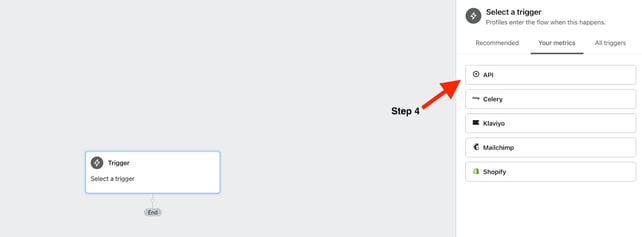
Afterward, you can customize your Flow however you'd like—and remember, we're here to help if you need any support.
Once events are flowing into your account, you can build automation in Klaviyo like this:
- **Trigger**: `Product Viewed [Checkmate]`
- **Filter**: Not placed an order in X days
- **Action**: Send a reminder or discount based on SKU
You can find all `[Checkmate]` events inside Klaviyo under **Profiles \> Event Activity**, or while building a new flow.
Visit **[Onboarding Checklist](https://faqs.joincheckmate.com/post-onboarding-checklist?hsLang=en)** for best practices regarding creating Klaviyo flows.
- [Getting Started](https://faqs.usemate.ai/getting-started?hsLang=en)
- [Enrichment](https://faqs.usemate.ai/enrichment?hsLang=en)
- [Targeting](https://faqs.usemate.ai/targeting?hsLang=en)
- [Audiences](https://faqs.usemate.ai/audiences?hsLang=en)
- [Case Studies](https://faqs.usemate.ai/case-studies?hsLang=en)
- [FAQs](https://faqs.usemate.ai/faqs?hsLang=en)
# usemate.ai
[mailto:email@email.com](mailto:email@email.com)
Copyright © 2026, usemate.ai