---
title: Post Onboarding Checklist
description: Post onboarding checklist for targeting
---
[Skip to content](https://faqs.usemate.ai/targeting-post-onboarding-checklist#main-content)
[](https://faqs.joincheckmate.com/?hsLang=en)
Open main navigation
Close main navigation
- [Contact support](mailto:csm@joincheckmate.com)
[Contact support](mailto:csm@joincheckmate.com)
How can we help you?
- There are no suggestions because the search field is empty.
1. [Checkmate FAQ](https://faqs.usemate.ai/?hsLang=en)
2. [Targeting](https://faqs.usemate.ai/targeting?hsLang=en)
# Post Onboarding Checklist
## Use this list to ensure your Targeting campaigns are set up for maximum impact
---
#### **1. Confirm Your Offer is Competitive**
Your Targeting offer should at least match any site wide promotion or welcome offer you’re running — ideally, it should be higher to incentivize action.
For example, if your site-wide sale is 20% off, your Targeting offer should be at least 20%. Ideally, it would be +5% more (recommended).
A weaker offer risks shoppers ignoring the Targeting prompt and opting for the existing promotion instead.
---
#### **2. How You’re Surfaced in Checkmate**
- **Bounce** – Email offer triggered by abandonment
- **Basic Targeting** – Standard offer shown across Checkmate partner channels
Settings to review:
- Acquisition offer (% off, $ off, or cart size threshold - *i.e. spend Y to get $X or X% off*)
- Offer type (single-use code)
- Target audience (new or high-intent shoppers, with optional exclusions)
- Collection inclusions (full-priced items, sale items, etc.)
---
#### **3. Setting Up a Custom Bounce Campaign**
**Offer Types:**
- Generate single-use code
- Existing brand campaign (optional code - or no-code): You can update your offer during site-wide sales or key moments to temporarily promote a brand campaign that doesn’t require a code, or that uses a static code. During this period, the campaign highlights the key moment, and afterward, it can automatically switch back to single-use code generation.
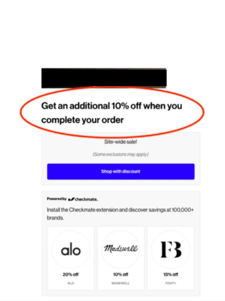
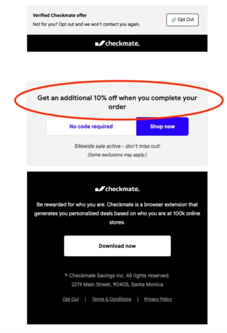
When creating a bounce campaign, we can help set Custom Discount Text to replace the default messaging:
- Example: Running “Extra 10% Off Sale Items”? Set your Custom Discount Text to:
*“Get an additional 10% off when you complete your order”*
---
#### **4. Avoid Promo Fatigue**
You can exclude **high-AOV customers** or **loyalty members** to protect margins. [Contact us](http://calendar.app.google/vZLnkQgaoHMgGfE48) for segment-based exclusions.
Use **stand downs** to avoid over-discounting:
- **Short delays (24–48 hrs)** – Welcome or cart abandonment flows
- **Longer delays** – Post-purchase or win-back
You can find more information on setting up stand downs at:
- [Creating Stand Downs with ESPs](https://faqs.usemate.ai/creating-stand-downs-for-klaviyo?hsLang=en)
- [Creating Stand Downs with Attentive ](https://faqs.joincheckmate.com/creating-stand-downs-with-attentive?hsLang=en)
---
#### **5. Segment Premium Users**
Ask us about excluding high-AOV customers or loyalty members from broad offers to protect your margins.
---
#### **6. Setting Up Partner Codes**
To ensure proper affiliate tracking or marketplace attribution, make sure the following settings are in place:
- **AWIN:** Toolbox → Links & Tools → My Offers → Add Voucher → Enable Voucher Attribution → Set publisher exclusivity to *Checkmate (id: 1249057)*
- **Ascend:** Creatives → Coupons → Add New Coupon → Format *CHECKMATE*\* → Assign to *Checkmate (id: 309846)*
- **Impact:** Engage → Promo Codes → Create Promo Code → Regex *^(CHECKMATE).* → Assign to *Checkmate Shopping (id: 398816)*
---
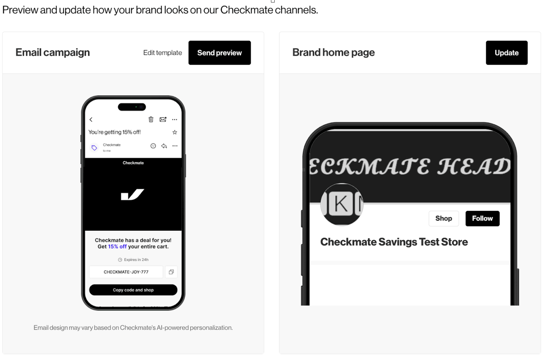
#### **7. Preview and update how your brand looks on our Checkmate channels.**
**Check your [Checkmate Targeting Dashboard](https://admin.shopify.com/store/checkmate-savings-test-store/apps/checkmate-5/app/analytics-v2/targeting) to preview and customize your brand assets in our Checkmate channels.**
---
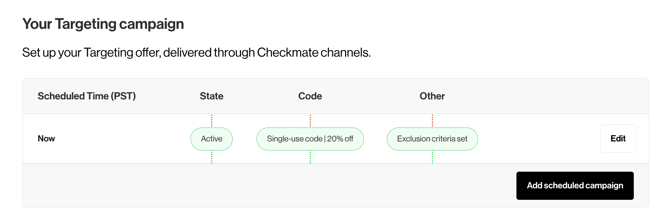
#### 8. Customize Targeting Campaigns
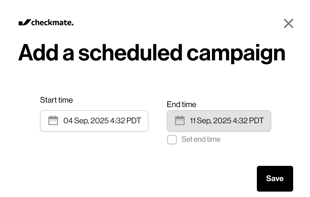
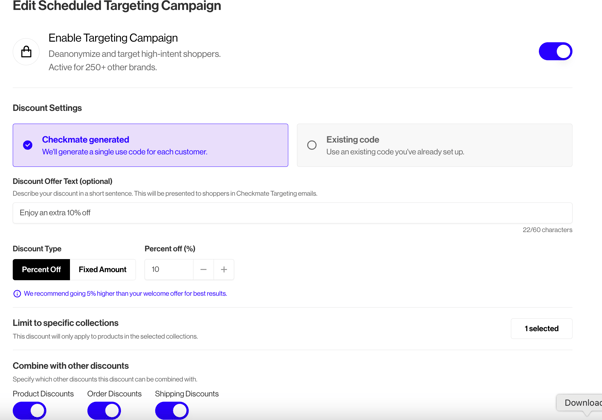
**Check your [Checkmate Targeting Dashboard](https://admin.shopify.com/store/checkmate-savings-test-store/apps/checkmate-5/app/analytics-v2/targeting) to** create or edit scheduled campaigns. Set start and end times to run promotions exactly when you want. For sitewide sales, select the **Existing Code** option and customize the discount text shown to shoppers. Choose between a percentage or fixed dollar discount, limit it to specific collections, and control whether it can be combined with other offers—giving you complete flexibility over your campaigns.
---
#### **9. Where to See Results**
Check your [Checkmate Dashboard](https://admin.shopify.com/store/checkmate-savings-test-store/apps/checkmate-5/app/analytics-v2/) for:
- Site traffic & identity resolution
- Orders & revenue driven by Targeting
- Engagement across email, SMS, and partner channels
Please visit [Checkmate Targeting Dashboard](https://faqs.joincheckmate.com/understanding-the-targeting-dashboard?hsLang=en) to learn more.
---
#### **10. When to Expect Impact**
Allow about **30 days** for a complete performance cycle, then review results and adjust offers or targeting for best ROI.
---
- [Getting Started](https://faqs.usemate.ai/getting-started?hsLang=en)
- [Enrichment](https://faqs.usemate.ai/enrichment?hsLang=en)
- [Targeting](https://faqs.usemate.ai/targeting?hsLang=en)
- [Audiences](https://faqs.usemate.ai/audiences?hsLang=en)
- [Case Studies](https://faqs.usemate.ai/case-studies?hsLang=en)
- [FAQs](https://faqs.usemate.ai/faqs?hsLang=en)
# usemate.ai
[mailto:email@email.com](mailto:email@email.com)
Copyright © 2026, usemate.ai