---
title: Understanding the Enrichment Dashboard
description: Understanding Enrichment Dashboard
---
[Skip to content](https://faqs.usemate.ai/understanding-the-enrichment-dashboard#main-content)
[](https://faqs.joincheckmate.com/?hsLang=en)
Open main navigation
Close main navigation
- [Contact support](mailto:csm@joincheckmate.com)
[Contact support](mailto:csm@joincheckmate.com)
How can we help you?
- There are no suggestions because the search field is empty.
1. [Checkmate FAQ](https://faqs.usemate.ai/?hsLang=en)
2. [Enrichment](https://faqs.usemate.ai/enrichment?hsLang=en)
# Understanding the Enrichment Dashboard
## Checkmate provides product-specific dashboards to help you understand performance across Enrichment, Targeting, and Audiences.
---
#### Accessing Your Dashboard
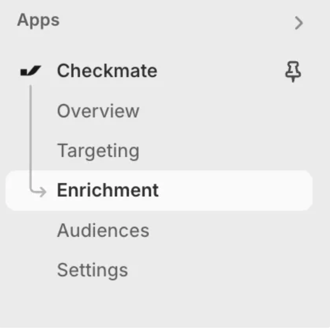
Navigate to the “Enrichment” tab under the Checkmate app in your Shopify store.
You can also follow this link - [Checkmate Dashboard](https://admin.shopify.com/store/checkmate-savings-test-store/apps/checkmate-5/app/analytics-v2/).
---
#### Understanding Your Dashboard - Overview
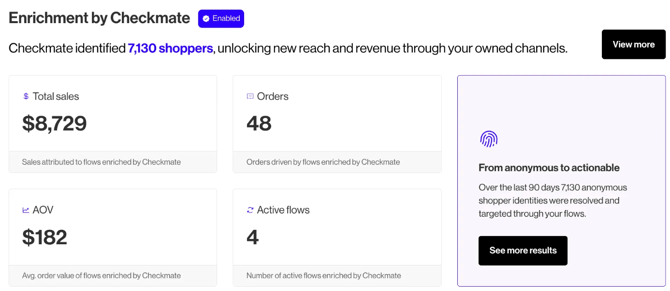
Each product has its own dashboard tab, along with a combined overview. Here’s what you’ll see:
#### **Metrics:**
***Total Sales:*** total sales, for the filtered time period, that are Checkmate attributable
***Orders:*** total orders, for the filtered time period, that are Checkmate attributable
***AOV:*** Average order value of Checkmate - driven orders
***Active Flows**:* Current number of flows using Checkmate triggers
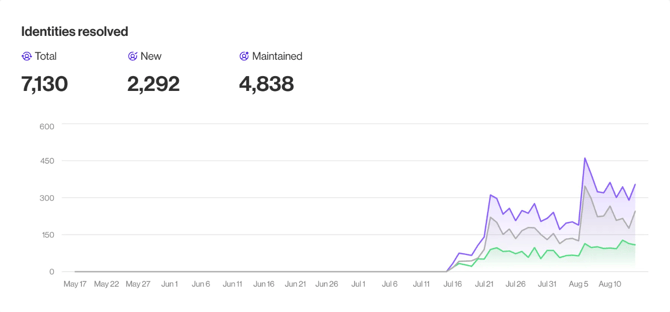
***Total Identities Resolved:*** The total number of customer identities Checkmate has recognized (both new and existing)
***New Identities Resolved:*** The number of times Checkmate added a brand-new user to your CRM
***Maintained Identities Resolved:*** The number of times Checkmate identified an existing user in your CRM who was unknown to you at the time
---
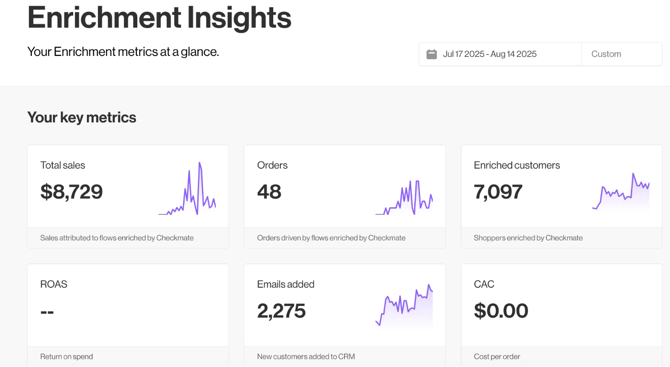
### Enrichment Insights - Expanded
#### **Metrics:**
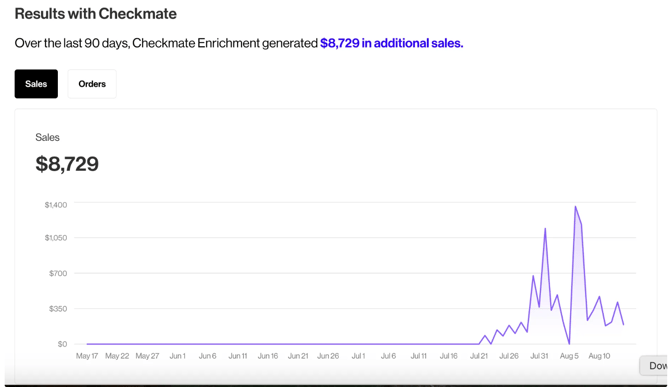
***Total Sales:*** total sales, for the filtered time period, that are Checkmate attributable
- Calculated by: The sum total GMV of Checkmate attributable orders
***Orders:*** total orders, for the filtered time period, that are Checkmate attributable
- Calculated by: The number of Checkmate attributable orders
***AOV:*** Average order value of Checkmate - driven orders
- Calculated by: Total Sales ÷ Total Orders
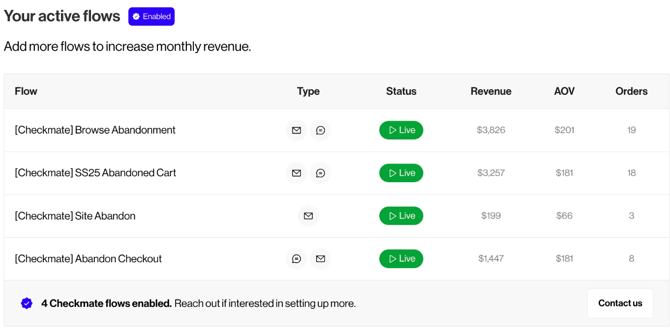
***Active Flows**:* Current number of flows using Checkmate triggers
***CAC:*** Customer Acquisition Cost (***will show as $0 if on trial**)*
- Calculated by: Enrichment billed amount ÷ number of enrichment orders
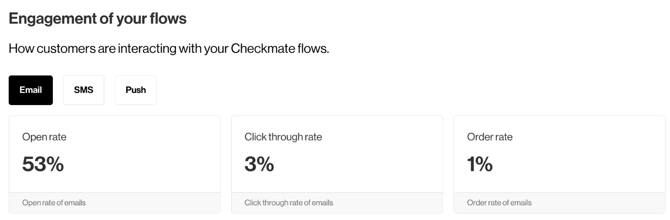
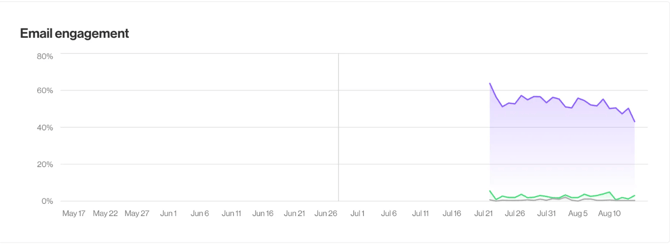
***Open Rate:*** The percentage of delivered emails that were opened by recipients
- Calculated by: Number of unique opens ÷ number of delivered emails
***Click Through Rate:*** The percentage of opened emails that had at least one link clicked
- Calculated by: Number of unique clicks ÷ number of unique opens
***Order Rate:*** The percentage of delivered emails that resulted in a purchase
- Calculated by: Number of unique orders ÷ number of delivered emails
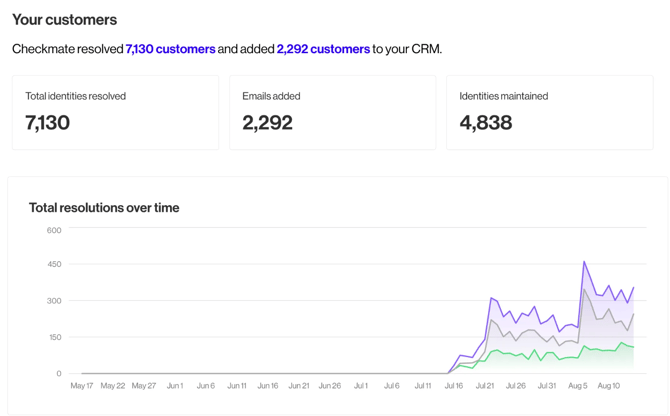
***Total Identities Resolved:*** The total number of customer identities Checkmate has recognized (both new and existing).
- Calculated by: Number of new identities resolved + number of maintained identities resolved
***New Identities Resolved:*** The number of times Checkmate added a brand-new user to your CRM
- Calculated by: Count of new users added to the brand's CRM by Checkmate
***Maintained Identities Resolved:*** The number of times Checkmate identified an existing user in your CRM who was unknown to you at the time
- Calculated by: Count of maintained identities matched to existing CRM records
---
### Resolving Discrepancies
If your metrics look off or you're missing events, here are a few things to check:
- **Attribution window**: Checkmate uses last-touch attribution unless otherwise agreed.
- **Klaviyo integration**: Make sure your API key is correctly configured and events are being pushed into your CRM.
- **Offer code format**: Only codes generated by Checkmate are tracked for CPA billing.
- **Timeframe mismatch**: Dashboards default to 7 days; adjust filters to compare longer trends.
Not seeing data? You may be looking at a timeframe outside of our current sync window or may need to complete setup.
- [Getting Started](https://faqs.usemate.ai/getting-started?hsLang=en)
- [Enrichment](https://faqs.usemate.ai/enrichment?hsLang=en)
- [Targeting](https://faqs.usemate.ai/targeting?hsLang=en)
- [Audiences](https://faqs.usemate.ai/audiences?hsLang=en)
- [Case Studies](https://faqs.usemate.ai/case-studies?hsLang=en)
- [FAQs](https://faqs.usemate.ai/faqs?hsLang=en)
# usemate.ai
[mailto:email@email.com](mailto:email@email.com)
Copyright © 2026, usemate.ai